After taking a graduate course on teaching science, I have been trying to integrate the idea of science notebooks into my sixth grade science classroom. We are working on sky science, and so I created the following notebook. Using Google Classroom, I shared it with my students, who have been working through the different tasks. Below are some of the resources we learned about in my course on science notebooks that I found useful. My hope is that as the year progresses, my use of science notebooks will begin to be more authentic and align with the nature of science and the practices of real scientists.
http://www.sciencenotebooks.org/
http://goo.gl/XykRnA
http://goo.gl/XykRnA
http://ebecri.org/content/toolkit
Our Science notebooks:
http://goo.gl/p9nWY6
Wednesday, 17 December 2014

Friday, 12 December 2014
Race to Save Christmas
https://drive.google.com/folderview?id=0ByN_OLXLIuI2bWdubW9EYUpzOWs&usp=sharing
In grade one, we have been working on a Christmas game, where the kids solve riddles and math clues to try and save the North Pole from some bad elves that have invaded! The link above is to the folder with all the resources if you wanted to check it out. When they solve a clue, we tweet "santa" (I made an account @mr_clausHOHO), and Santa Tweets us back our next clue the following day. We tracked our progress on a big paper map of the north pole, but I also made a digital copy.

Here is an example of our Tweets from Santa


In grade one, we have been working on a Christmas game, where the kids solve riddles and math clues to try and save the North Pole from some bad elves that have invaded! The link above is to the folder with all the resources if you wanted to check it out. When they solve a clue, we tweet "santa" (I made an account @mr_clausHOHO), and Santa Tweets us back our next clue the following day. We tracked our progress on a big paper map of the north pole, but I also made a digital copy.
Here is an example of our Tweets from Santa
This is an example of one of the math clues the kids had to solve
This project was just a fun way to spend December, while still working on math problems. The Twitter aspect made the kids really buy in!
#HourOfCode
I decided that I would introduce my class to the hour of code. After reading a lot about it on Twitter, I realized that even though it doesn't specifically align with our outcomes, it does teach students a whole bunch of essential skills that they need to learn, such as problem solving, communicating, patterning, enhancing their understanding of technology and engaging them at a difficult time of year. Below are the sites that we used for our hour of code:
www.madewithcode.com/projects
www.crunchzilla.com/code-monster
scratch.mit.edu
studio.code.org/s/frozen/stage/1/puzzle/1
codecombat.com
Thursday, 27 November 2014
Exit Pass Templates
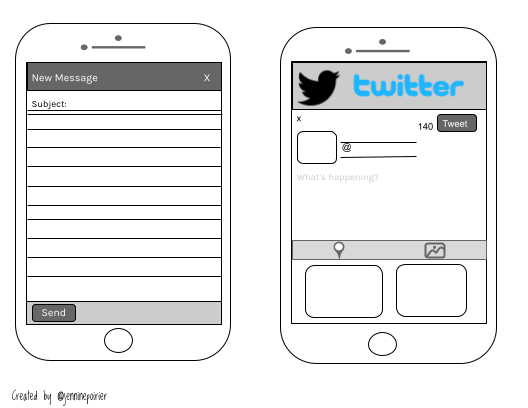
I usually try to have my students authentically use Twitter in the classroom, along with other tools such as Today's Meet, Padlet, or Socrative to do digital exit passes. However, today we had the internet go down at our school, and it reminded me that sometimes we need an alternative. So I created the following templates to help engage students. The PDF is linked below.

https://drive.google.com/file/d/0ByN_OLXLIuI2MkowcDFqNndMNHc/view?usp=sharing
https://drive.google.com/file/d/0ByN_OLXLIuI2MkowcDFqNndMNHc/view?usp=sharing
Wednesday, 26 November 2014
Race Through Space- Science Game
This year, I started down the path of implementing elements of game-based learning into my classroom. After taking a course on technology this summer and reading the book "Reality is Broken" by Jane McGonigal, I really began to see the benefit of engaging students in a non-traditional way. The trend of using elements of games (such as badges, levels, quests or missions, etc.) is referred to as gamification. The first big game we did this year was something I called the "Zombie Apocalypse: Math Edition". Students earned supplies to survive the zombie apocalypse, which they did by correctly answering math problems, or demonstrating mathematical thinking. I have embedded it below if anyone is interested in checking it out.
This month, the game I created relates to science. Students will be using clues to track Santa through the solar system in a race to save Christmas. We are using a passport and badges to track their progress. The kids are really excited to get started, and I can't wait to see how quickly they learn all about sky science. I have add a link to the project and an example of my badges below.
http://goo.gl/3Dq09j
Wednesday, 29 October 2014
Using Google Draw
I have found myself using Google Draw a lot in my classroom lately. Below are a few examples of ways that I have found it useful:
1. Creating student sheets for math
Ordinarily, it is quite difficult to get student sheets formatted the way you want in math. Google Draw allows you to freely move objects around, which is ideal for math! I always just modify the page size to custom and then input 8.5 X 11 so that it prints on a standard page.
 2. Creating Badges
With my grade sixes, I have tried to take a more gamified approach to math this year, using badges to notify students when they have "levelled up", beat a boss level problem, or are demonstrating mathematical thinking and vocabulary. I make all of my badges in Google Draw, and then I also use classbadges.com to award them to students. They find it extremely motivating! I also sometimes make badges for my first graders to send home in their agendas. Below are two badge examples.
2. Creating Badges
With my grade sixes, I have tried to take a more gamified approach to math this year, using badges to notify students when they have "levelled up", beat a boss level problem, or are demonstrating mathematical thinking and vocabulary. I make all of my badges in Google Draw, and then I also use classbadges.com to award them to students. They find it extremely motivating! I also sometimes make badges for my first graders to send home in their agendas. Below are two badge examples.


In teaching grade one, I often create sheets to laminate as parts of my centres. I create the individual sheets using Google Draw. Once I have them all finished, I download them as PDFs, and use a chrome app called PDFmergy to put them all together into one PDF document to share with colleagues. Below is an example.

1. Creating student sheets for math
Ordinarily, it is quite difficult to get student sheets formatted the way you want in math. Google Draw allows you to freely move objects around, which is ideal for math! I always just modify the page size to custom and then input 8.5 X 11 so that it prints on a standard page.
In teaching grade one, I often create sheets to laminate as parts of my centres. I create the individual sheets using Google Draw. Once I have them all finished, I download them as PDFs, and use a chrome app called PDFmergy to put them all together into one PDF document to share with colleagues. Below is an example.
Monday, 20 October 2014
Grade One Porfolio
In my division II classes, students are able to create their own individual digital portfolios by creating a Google site. However, in my grade one classroom, I had to think of a different way to create a digital collection of student work. The solution that I came up with was creating one classroom site, with a page for each individual student. In Google Drive, I created a folder for each student, which I then inserted into their page on our Google Site.
When students do work on the iPad, or take pictures, they use the Google Drive app (Which is signed into our class account) to upload their photos to their folder. This is awesome because it automatically updates their folder on their site!
Friday, 17 October 2014
Number Introduction Centres
We just started transitioning into working with numbers from 1-20, and so I created a new set of centres to get kids to get a sense of number. Attached at the bottom is a link to all the necessary templates you would need to create your own.
Templates for Centre Activities
https://drive.google.com/file/d/0ByN_OLXLIuI2THNJZVNmRDBMYlU/view?usp=sharing
Templates for Centre Activities
https://drive.google.com/file/d/0ByN_OLXLIuI2THNJZVNmRDBMYlU/view?usp=sharing
Wednesday, 15 October 2014
Math Pattern Centers
I have been putting together Centers for my grade one patterning unit. Here are all of my resources to make the bins
These are the Labels I am taping to the outside of the bins to identify them
The sheets below are going into page protectors and into the bins to start off the centers. This way students who aren't able to create their own patterns can mirror these patterns.
This is the link to my outline of all of the centres
https://docs.google.com/document/d/1wtSZ6tuUfm0UbDd_mzskGkWJMDLum6c_tdmxS-p_sIU/edit?usp=sharing
Or you can check them out below:
These are the Labels I am taping to the outside of the bins to identify them
The sheets below are going into page protectors and into the bins to start off the centers. This way students who aren't able to create their own patterns can mirror these patterns.
This is the link to my outline of all of the centres
https://docs.google.com/document/d/1wtSZ6tuUfm0UbDd_mzskGkWJMDLum6c_tdmxS-p_sIU/edit?usp=sharing
Or you can check them out below:
Trees of Alberta Project
We are just beginning to work on a science project on the Trees of Alberta
Here is a link to my research outline for students
Field Notes and Research Journal
Part of our program of studies requires students to Identify characteristics of at least four types of trees found in the local environment, including 2 coniferous and 2 deciduous trees. So I created a journal-style template to help students take "field notes" about their tree, similar to the way that scientists might take notes to record their observations out in the field. I included the next 2 pages four times so that students had one for each of the trees they would need to research


Here is a link to my research outline for students
Field Notes and Research Journal
Part of our program of studies requires students to Identify characteristics of at least four types of trees found in the local environment, including 2 coniferous and 2 deciduous trees. So I created a journal-style template to help students take "field notes" about their tree, similar to the way that scientists might take notes to record their observations out in the field. I included the next 2 pages four times so that students had one for each of the trees they would need to research
Then, to guide them through the research process and allow them to demonstrate their understanding of topics we have previously discussed in class, students will also have the following pages attached to their field notes booklet
All of these pages were created using Google Draw. I modified the page size to "custom" and made it 8.5x11 so that it would print out on a normal page. Finally, once all my pages were done, I downloaded them as PDFs and used the app "PDF Mergy" to put them all together in one document.
To try something new, I also posted this resource on Teachers Pay Teachers for free. This is the link to the listing.
Of course, no project would be complete without a chance to do a self-assessment
Math Zombie Apocalypse
Zombie Apocalypse: Math Style!

In my 6th grade classroom, our math lessons have taken a markedly zombie form. The zombie apocalypse is upon us, and the only way to save ourselves is to use our mathematical knowledge and thinking to earn supplies. Each week, there are a few updates, and these determine who will survive, and who will become a victim of the outbreak! The link above is to a Google Folder with all of the required resources necessary to host a zombie apocalypse in your math classroom. The students are SO engaged, and it is a great way to touch on many math concepts in a fun way.
This is the link to the outline of how the game works
Sunday, 14 September 2014
Publishing Google Docs to Blogger
<iframe width=600 height=500 src=......>
I have been trying to get my Google docs embedded nicely in blogger so that they weren't super tiny. The html coding above solved the problem when I was using the embed code after publishing the document online! Yay!
I have been trying to get my Google docs embedded nicely in blogger so that they weren't super tiny. The html coding above solved the problem when I was using the embed code after publishing the document online! Yay!
Sunday, 7 September 2014
A few technology links
http://www.edudemic.com/best-web-tools-teachers/
According to this article from Edudemic, the 9 best web tools teachers will use this year are:
According to this article from Edudemic, the 9 best web tools teachers will use this year are:
- Padlet
- Socrative- student response system
- Polldaddy
- google forms
- fotobabble
- remind101
- screenr- Creating screencasts
- Audioboo- record audio messages to share
- smore
_________________________________________________________________
View this article to read about 20 different things you can do with Google Classroom
_________________________________________________________________
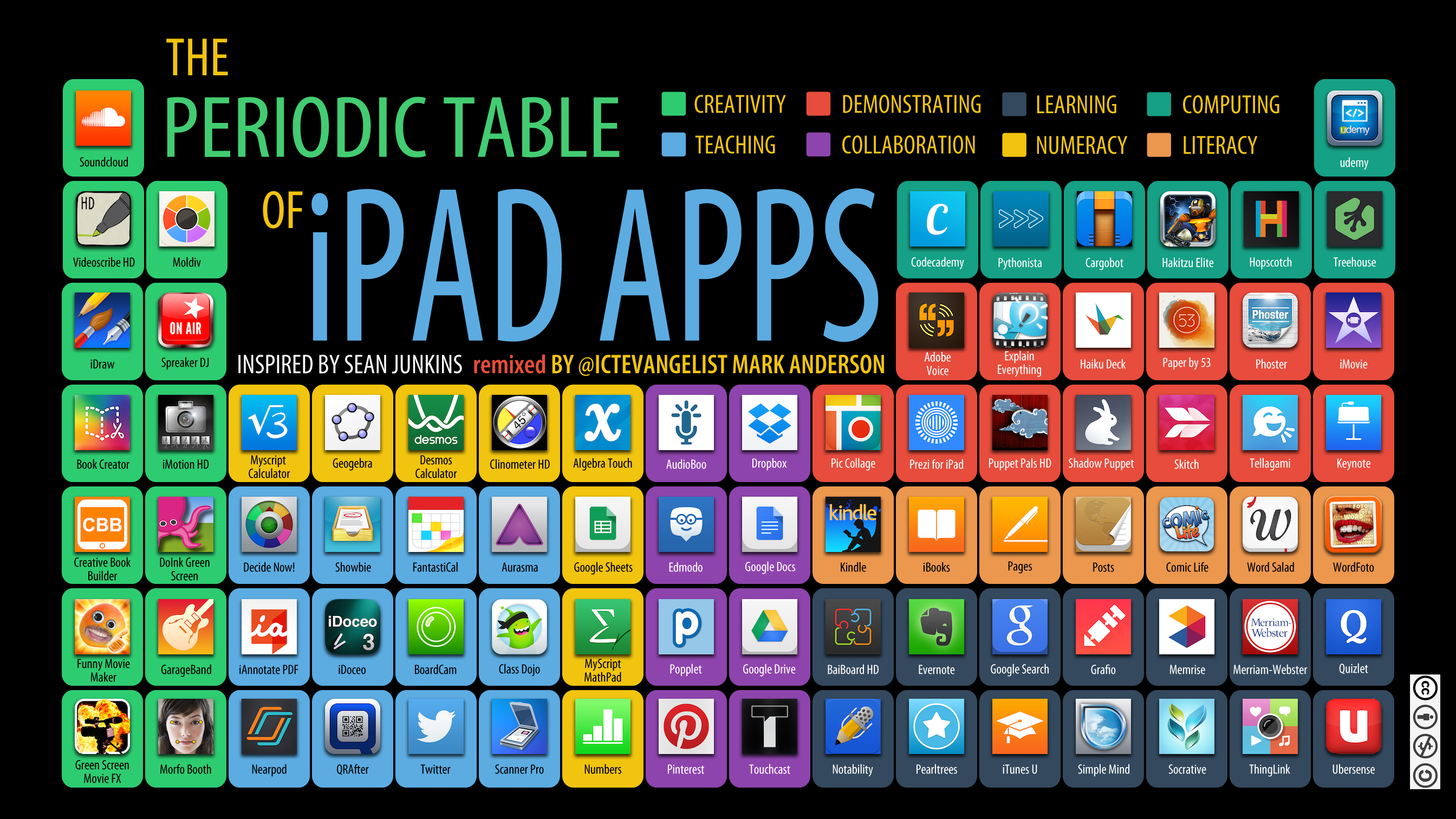
This is a great resource for apps to use with the iPads. Click the link in the caption to view original source
 |
| http://ictevangelist.com/wp-content/uploads/2014/07/PTAPPS-ICTEvangelist.png |
_________________________________________________________________
Finally, this infograph from dailygenius on how to use the iPad to run your classroom. It is a bit small, but you can click on the link in the caption to navigate to the original source.
 |
| http://dailygenius.com/can-run-classroom-ipad/ |
Tuesday, 26 August 2014
Epic world of math
After doing lots of reading about gamification, I decided to take the plunge, and created "The epic world of math". Students will work towards levelling up (challenging increasingly difficult problems), go on missions and quests, earn badges, and at the end of the unit, challenge boss levels (problems that require them to apply their knowledge in new ways). Should be fun!
This is the link to my site that I am using with students:
https://sites.google.com/a/sperd.ca/epic-world-of-6c-math/
(Only members of the SPERD domain can view!)
I created this infograph using piktochart that I included on the front page of my site to get students pumped up about our new approach to math

This is the link to my site that I am using with students:
https://sites.google.com/a/sperd.ca/epic-world-of-6c-math/
(Only members of the SPERD domain can view!)
I created this infograph using piktochart that I included on the front page of my site to get students pumped up about our new approach to math
Vision for the future
Vision of the future of Education
As part of an assignment for my EDEL 545 course through the university of Alberta, we were required to create a presentation that reflected our vision for the future of education. This is my vision. If you click on the link below the slide deck, you will be able to see the presentation with my notes included, which contains many links and more concise information about what each topic entails.
https://www.haikudeck.com/my-vision-for-the-future-education-presentation-J9XNfEBxJL
My Vision for the Future - Created with Haiku Deck, presentation software that inspires
Tuesday, 19 August 2014
Google Piktochart
I was playing around with Piktocharts this week, and so I decided to make my own infograph about Google in the Classroom. Here it is :)
Wednesday, 30 July 2014
Technology Resources
http://www.livebinders.com/play/play?id=439108
This is an amazing resource!!
For my emerging technology course I am taking, we had to make group presentations about various topics in education related to technology. Here some links to some amazing sites:
1:1 technology
https://sites.google.com/a/ualberta.ca/1-to-1-technology/
This is an amazing resource!!
For my emerging technology course I am taking, we had to make group presentations about various topics in education related to technology. Here some links to some amazing sites:
Digital Citizenship
Maker movement
Copyright and creative commons
https://sites.google.com/site/copyrightforclassrooms/ 1:1 technology
https://sites.google.com/a/ualberta.ca/1-to-1-technology/
Thursday, 24 July 2014

Wednesday, 23 July 2014
Game Design in Education
As I continue to read more about games in education, I have came across the following links. I just wanted to keep a record of them so that I could go back to them and look at them again later.
http://www.teachers.ab.ca/Publications/ATA%20Magazine/Volume-93/Number-3/Pages/Kandise-Salerno.aspx
This site discusses "sandbox" games
https://sites.google.com/a/ualberta.ca/video-games-creation/home
This is a site about video games and highlights student exemplars
http://projectpixelpress.com/
Pixel Press is a great game creation site, where you are able to design your own game
http://www.teachers.ab.ca/Publications/ATA%20Magazine/Volume-93/Number-3/Pages/Kandise-Salerno.aspx
This site discusses "sandbox" games
https://sites.google.com/a/ualberta.ca/video-games-creation/home
This is a site about video games and highlights student exemplars
http://projectpixelpress.com/
Pixel Press is a great game creation site, where you are able to design your own game
Thursday, 17 July 2014
Gamifying Learning
Lately, I have been contemplating taking a more games-based approach to my math program. I came across this really great resources from the institute of play, and so I am hoping to use this to design some games to use next year. Another cool tool I read about is class badges- You can design and award badges to your class for their achievements. I can't wait to use that too!
Subscribe to:
Posts (Atom)